
When it comes to tech deals online, it’s easy to be tempted by low prices. Unfortunately, some of these deals are far too good to be true. One Internet user learned this the hard way after his “1TB external hard drive” turned out to be nothing more than a crude scam.
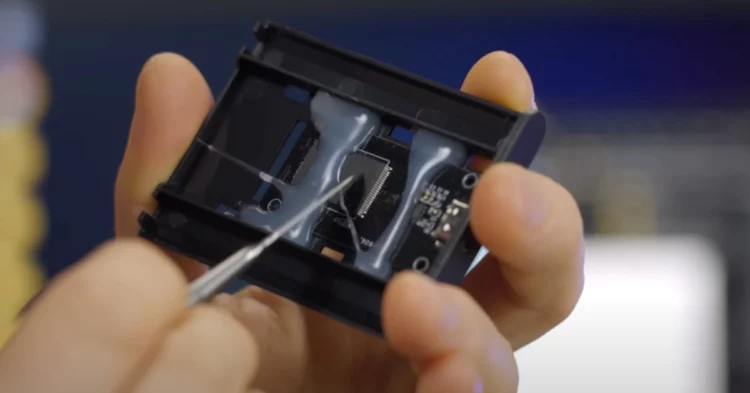
The device had been working quietly for three years, appearing perfectly functional—until it suddenly stopped working. Curious and frustrated, the user cracked open the casing, expecting to find a typical hard disk drive. What he found inside was shocking.
Table of Contents
What Was Really Inside the Fake Hard Drive?
No Moving Parts, No Storage—Just Glue and Deception
Inside the hard drive’s shell, there were none of the essential components found in a genuine HDD. There was no magnetic disk, no read/write arm, and certainly no real storage. Instead, the user found:
- A low-grade flash memory chip
- Hot glue holding it in place
- A small metal weight to give the illusion of heft
- Loose wiring poorly soldered to a USB connector
This was not a damaged product or factory error—it was a full-on fraud. The exterior looked legitimate, but the internals were nothing more than cheap parts designed to trick both software and users.
A Common Scam Hidden in Plain Sight
Why Fake Hard Drives Keep Slipping Through the Cracks
Unfortunately, this isn’t a one-off incident. Numerous online shoppers have reported nearly identical experiences, especially on major e-commerce platforms like Amazon and eBay. The scam works in subtle but effective ways:
- Scammers purchase real products and swap the internals with fakes.
- They return the counterfeit item for a refund.
- The returned item is then unknowingly resold to another unsuspecting customer.
Even sophisticated return systems often fail to catch these swaps, allowing the fake products to continue circulating.
How to Spot and Avoid Counterfeit Tech Products
The Signs May Not Be Obvious
At a glance, these fake hard drives are nearly impossible to identify. They power on, they show the correct storage capacity in file explorer, and they often pass basic usage tests—for a while. But beneath the surface, they’re completely unreliable.
To detect fakes, consider the following steps:
- Use disk benchmarking tools like CrystalDiskInfo or Blackmagic Disk Speed Test. These reveal actual storage capacity and performance.
- Check read/write speeds. Counterfeit drives usually have very low transfer rates compared to genuine models.
- Test large file transfers. Fakes often “appear” to store data but will lose it or become corrupt.
Quantum Engine Powered Without Gas or Hydrogen Heralds a New Era for Humanity
Don’t Trust the Deal—Trust the Seller
Better to Pay More for Peace of Mind
This story is a harsh reminder that with tech, you often get what you pay for. The safest approach is to:
- Buy from authorized or well-reviewed sellers
- Test new hardware immediately, even if it seems to work
- Be wary of heavily discounted items with limited brand information
A few minutes of testing could save you from losing irreplaceable data or money to a scammer. If you’ve recently purchased a suspiciously cheap hard drive or tech accessory, take the time to verify its integrity before trusting it with your important files.
Final Thoughts: Protect Yourself from Fake Hardware Scams
Technology scams are getting more sophisticated, and fake hardware is one of the most dangerous types—because you may not realize something’s wrong until it’s too late. This user’s unfortunate discovery serves as a wake-up call: be vigilant, be skeptical, and always test your devices.